Decision Logic
Open the Decision Table for the Order Amount decision. From the DRD, we now know that there are two inputs:
-
Inventory Level (
inventory_level) -
Storage Tier (
storage_tier)
Inputs
Create two input columns in the table and name them as the first element in the list above. When you double-click the column headers to change the name, a pop-up menu is shown. Use the second element from the list above to give both Inputs their Expression value.
Note how inventory_level was the name of the variable we chose for the Inventory Level decision; using the value inventory_level as the input’s Expression is how the dependant table uses the output of the supporting decision.
|
Choose number as the type for the Inventory Level input.
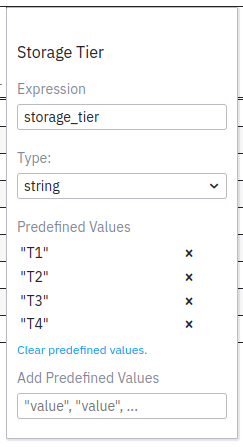
Now double-click the Storage Tier column header again and go to the field Add Predefined Values. Here you can add the T1 up to T4 levels as the only possible options. Add them by pasting the following snippet into the field and pressing Enter. The Predefined Values section of the input column’s dialog is now populated with the values you entered.
"T1","T2","T3","T4"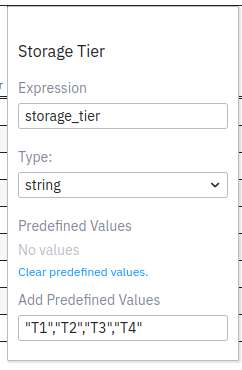
| If you don’t press Enter in Camunda Modeler when adding predefined values, they are not added. |
Outputs
There is one output column in the model. In this case, that’s enough. Double-click the header to configure its name and Output Name as follows:
-
Amount to Order (
amount_to_order)
Choose number as the type for the Amount to Order output.
The decision will determine how many items should be ordered, based on the item’s storage tier and current inventory level. The default hit policy of Unique is a perfect fit for our logic. Let’s define the rules for the table.
Rules
Have a look at the rules below. Do you understand the logic behind them?
| If we have less than… | And the tier is… | Then order… |
|---|---|---|
100 |
T1 |
250 |
50 |
T2 |
150 |
50 |
T3 |
100 |
30 |
T4 |
50 |
Transfer the description of the rules into the table.
|
Take note of the following when adding the rules.
|
Let’s run a first set of tests to see that the decision works as intended.