Deploy the Model
The bottom of Camunda Modeler has a bar with some utilities.
One of them is a little  icon that can be used to deploy models to a running Camunda engine.
Click it to open the dialog.
Click the Deploy button.
If deployment is successful, Modeler will temporarily display a notification to confirm.
icon that can be used to deploy models to a running Camunda engine.
Click it to open the dialog.
Click the Deploy button.
If deployment is successful, Modeler will temporarily display a notification to confirm.
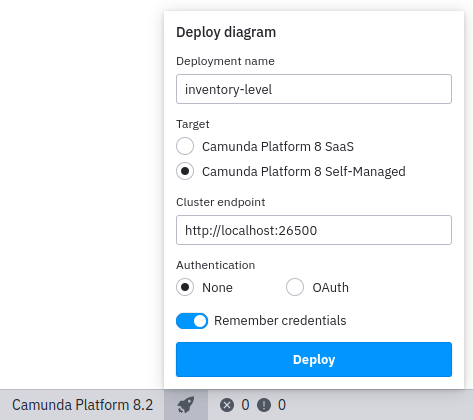
Figure 1. Deploy dialog in Camunda Modeler
In Camunda Operate in your browser, refresh the deployed decision models from Decisions. Use the Name dropdown in the menu to select the Inventory Level decision. You can inspect that the model you deployed from the Camunda Modeler is listed here.